Almost Every Analytics Tool Offers a Proxy to Beat Ad Blockers. Most Are a Time Bomb.
Open the docs of almost any analytics product — Matomo, Umami, Simple Analytics, Segment — and you'll find a page on proxying it past ad blockers. The pitch never changes: route the tracking through your own domain so it looks first-party, and the blocker can't tell it apart from your real code.
The oldest version of this is also the one still offered almost everywhere: a "managed" proxy with CNAME DNS record. Point a subdomain at your vendor, swap one line of script, done — no server to run. Even PostHog and Plausible still hand you a CNAME to set up, and it's exactly what the no-code "managed proxy" I commented on recently automates. It also stopped working in March 2021, when AdGuard began publishing an auto-updating list of CNAME-cloaked trackers.
The CNAME option is still in the docs, still a single click in a dashboard — quietly recovering nothing for the people who switch it on.
That's the shape of the whole category: a proxy almost never fails on day one. You wire it up, your numbers tick up a few percent, you think it's solved. The failure comes weeks or months later – quietly, after you've forgotten it exists – when your proxy's address lands in a public filter list and the recovered data just… stops. No alert. You find out when you notice declines or discrepancies in your analytics dashboards.
CNAME and a custom reverse proxy are both on that clock. They just run down at very different speeds.
CNAME proxies: blocked within days
A CNAME proxy points a subdomain like some-prefix.yoursite.com at your analytics vendor. The request leaves your domain, so a naive blocker that only knows the vendor's domain misses it. That worked for a couple of years — until the blocker ecosystem went after the DNS layer directly.
AdGuard runs the resolver side of this. Their users sit behind AdGuard DNS, so when a custom subdomain resolves to a known analytics endpoint, AdGuard sees it and adds it to a public, automatically-updated list of CNAME-cloaked trackers – thousands of entries, including analytics-proxy domains like custom.plausible.io and fathomdns.com. AdGuard's filter updates are then downstreamed to other ad blocker filter lists, and finally come as a filter update to all end users within a week.
On Firefox, uBlock Origin uncloaks CNAMEs on the fly: it resolves each request's hostname through the browser DNS API, and if that subdomain's CNAME lands on a domain already in its filter lists, it blocks the request before the script loads – nobody has to have catalogued your specific subdomain first. It's on by default on Firefox and still actively developed; the code was reworked in 2024 to filter on the resolved IP too. Brave does the same in its engine, and Chrome extensions are the odd exception – they get no DNS API, so they can't. Between AdGuard's list and live uncloaking, the gap between setting up a CNAME and a blocker seeing through it is immediate.
The strongest evidence isn't mine – it's the vendors saying so in their own docs.
Plausible, in their proxy guide:
"Adblockers now crawl the web looking for cnames and can block them when discovered so cname doesn't give you any better stats than our default script." — Plausible discussion
Fathom went further and pulled the feature. They launched custom domains in 2020 with a 🥳, and later wound them down – their own explanation is that they could spend hundreds of development hours adjusting how to bypass ad blockers only to be blocked again by a single line from a filter-list maintainer, and that custom domains are now blocked by uBlock and a few others anyway. GoatCounter keeps the feature but is blunt that it's "only intended as a vanity domain" and won't stop blockers.
Custom reverse proxies: blocked within months
TL;DR They may get blocked faster if your site is widely known, or maybe never if it's too niche, or tracking isn't on your homepage – depends.
The stronger version is a true reverse proxy: you serve analytics from your own origin under your own path – yoursite.com/abc/collect – with no CNAME to anything. There's no DNS chain to follow and the request is genuinely same-origin, so domain-based filtering and CNAME uncloaking both miss it.
This actually works today, and it's what most vendors now recommend over CNAME.
The catch is that "the URL is on your domain" isn't the same as "the URL is invisible". Filter lists don't only match domains – they match paths and query parameters regardless of domain. If your proxy keeps the recognizable shape – /g/collect, /gtag/js, ?v=2&tid=G-… – a generic rule still catches it on your first-party domain.
It happened in DataUnlocker's own PoC in 2020. Someone proxied gtag.js through their domain as mysite.com/www.googletagmanager.com/gtag/js?id=…. uBlock Origin still blocked it – not because it figured out the proxy, but because EasyList carries a generic /gtag/js path rule that fires on any domain. AdGuard, however, with a different list, let it through – which tells you how arbitrary the line is.
So a reverse proxy survives only if you also rename the path and all its parts that can match a filter, like parameters or well-known patterns (/collect, /gtag etc), and keep renaming them whenever a generic rule generalizes or someone reports your domain by hand.
Custom reverse proxies buy you months instead of days, but it's the same machine.
Can blockers detect the exact analytics product used behind a renamed proxy?
Say your path and parameters are renamed and nothing in the URL gives the vendor away. Can a blocker still tell that, for example, GA4 is running behind your proxy — from the shape of the data it sends, or from what the script does once it runs?
As of mid-2026, no blocker appears to do this for a genuinely first-party, renamed proxy. uBlock Origin's static filters match URLs, domains, and paths – not request-body shape. Its scriptlets can neutralize analytics by known global name (window.gtag, window.ga), but not if you avoid those names. The content-and-behavior approaches – AST classifiers like ASTrack, Brave's research on signatures of privacy-relevant JS behavior – exist in papers and roadmaps, not in the blocker you have installed. Manifest V3 actually pushes the other way, limiting what extensions can inspect about a request.
So today the honest answer is: a well-hidden custom proxy is caught mainly by URL patterns you forgot to rename, or by someone reporting your domain by hand – not by payload or behavior. The research is moving that way, though, and the people building it have more time and tooling than any single site owner.
What actually lasts
Step back and the pattern is clear: every proxy moves the tracker somewhere new and waits to be found by ad blocker community again. The work is yours, the deadline is theirs, and the only variable is how long until the next rule.
The one approach that doesn't decay is the opposite trade: stop hiding the data channel and instead make it something blocking would cost the user. Tie the analytics transport into the application itself – so the same channel that carries your events also carries something the page needs to function. Now a blocker can't strip the tracking without breaking the site, and breaking the site is the one thing blockers work hard to avoid. That's the idea behind DataUnlocker, and it's deliberately analytics-agnostic – it wires up whatever you already use (GA, a server-side GTM setup, Plausible, DataFast, your own pipeline) rather than replacing it.
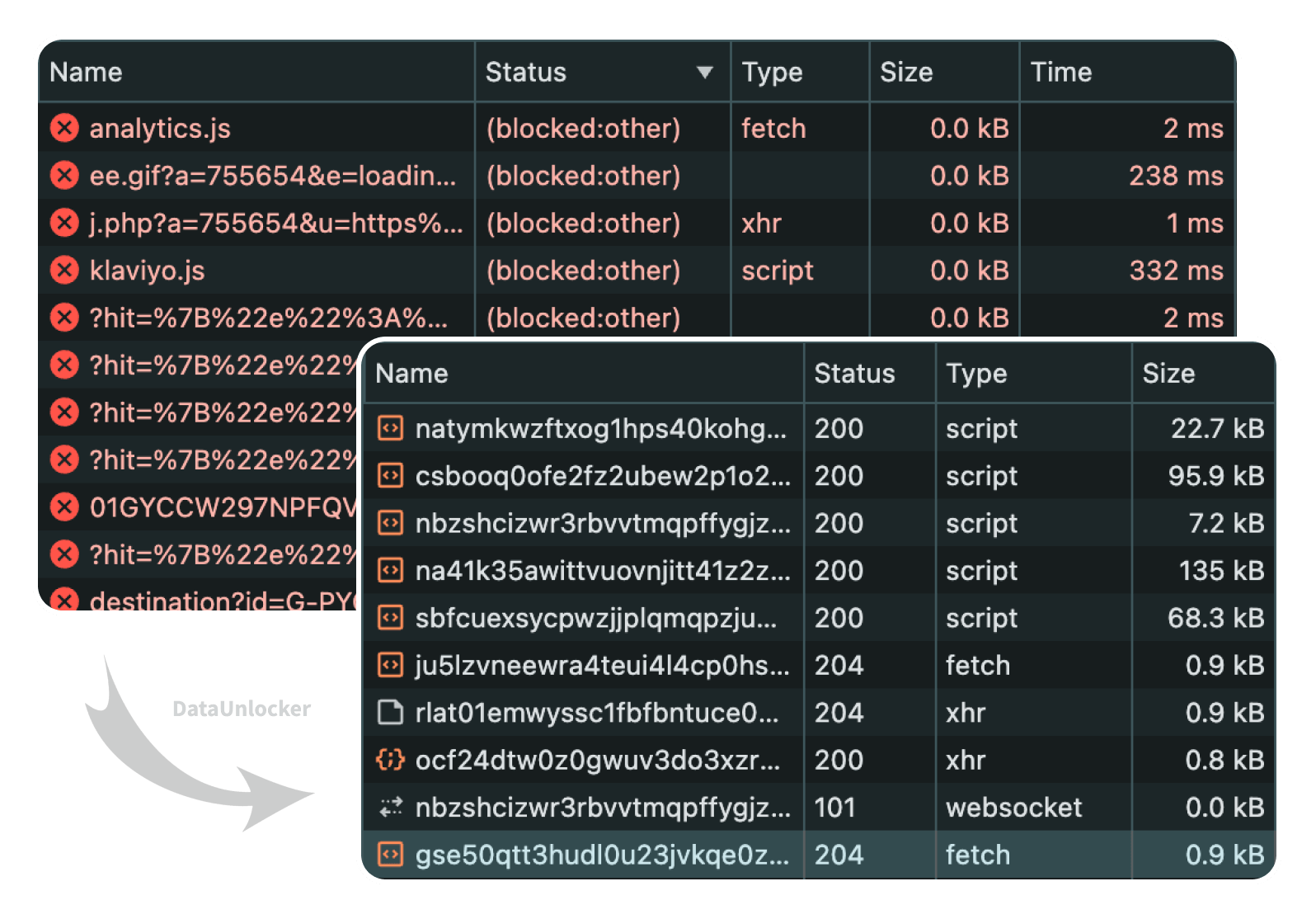
It's not free of trade-offs – cosmetic and script filters can still partially break a page, and there's a small cost to coupling data to functionality – which is a longer discussion than this post. I wrote the practical version, including a clever single-endpoint trick you can do without any product, in a companion piece: how to keep analytics past ad blockers, and which methods actually last.
If you just want to know whether a proxy you already run has been found, DataUnlocker monitors the filter lists for your domain for free and emails you when a new rule lands – which is usually the first you'd hear of it otherwise.
So to sum up, building a reverse proxy for analytics isn't wrong. It's just borrowed time, and it's worth knowing the loan's terms before you build on it.